
Pocket - AI Personal Assistant
OpenVisionEngineeringProductivity
4.8225.00 Reviews
- Version
- 0.6.76
- Installs
- 50.00K
- Age Rating
- Everyone
Screenshots
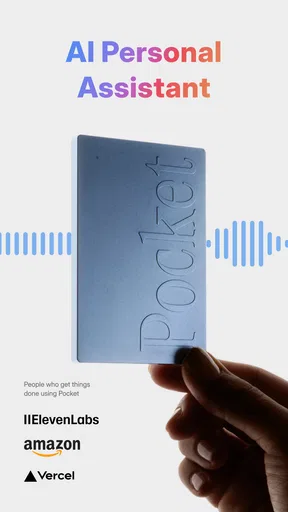
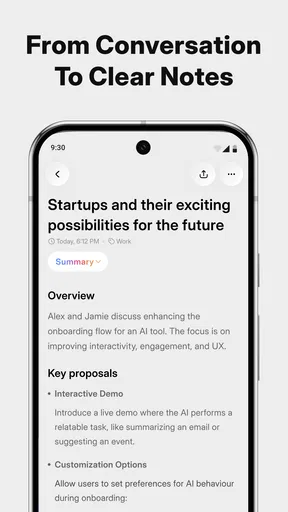
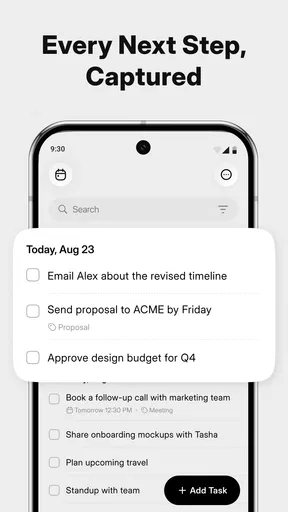
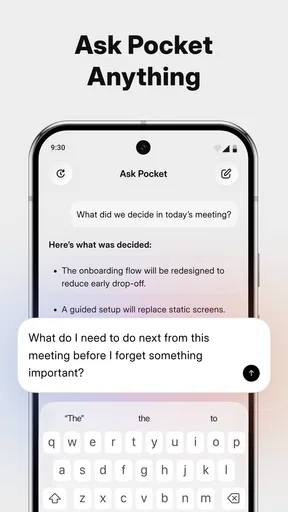
Our Review of Pocket - AI Personal Assistant
 Analysis by Appyee
I spent time using Pocket - AI Personal Assistant as a productivity companion, and the part that stayed with me was its focus on turning spoken meetings and loose ideas into something I can actually act on. It is not trying to be a full project-management suite or a replacement for a careful notebook. Its value is narrower and more practical: it helps me move from conversation to a usable record of what happened, what matters, and what should happen next.
That makes it interesting for anyone who regularly leaves a call with several half-remembered promises. Pocket is a free productivity app from OpenVisionEngineering, available for everyone to use on devices running Android 7.0 or later. It has reached over 50 thousand installs and holds a 4.8 average from around 2.1 thousand ratings, which suggests that its central idea is connecting with the people who need this kind of help.
Turning conversations into action is Pocket’s real strength
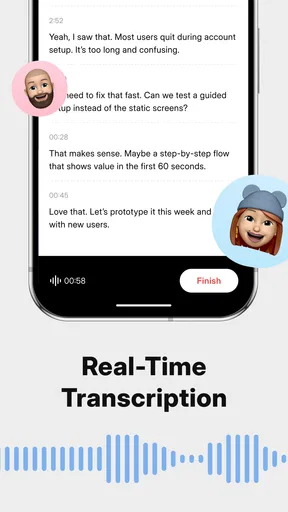
The store summary presents Pocket as an AI personal assistant for meetings, ideas, transcripts, and action items. In my experience, the most useful part of that description is not the transcript by itself. A transcript is only valuable when I can use it to recover decisions, responsibilities, and follow-up work without replaying an entire conversation.
That distinction matters. A conventional voice recorder preserves everything, but it leaves me with the job of sorting through it. A notes app is faster when I already know what I want to write, but it is less helpful when several people are speaking and the important detail arrives unexpectedly. Pocket sits between those approaches by treating spoken information as raw material for an organized follow-up process.
The practical promise is simple: spend less effort reconstructing a meeting and more effort acting on its result. That does not mean I would blindly accept every generated item. I still treat the transcript and action suggestions as a draft that needs a quick human check. The difference is that checking a prepared summary is much easier than rebuilding the conversation from memory.
I also found the idea useful outside formal meetings. A sudden idea recorded while walking, a reminder after a phone conversation, or a rough explanation of a task can all benefit from being captured before the details disappear. Pocket makes more sense to me as a bridge between thinking aloud and creating a reliable written reference.
The app’s current version is 0.6.76, so I approach it as a product that is still developing rather than a completely mature office platform. That is not automatically a problem. In fact, the focused purpose makes it easier to understand what I am getting: an AI-assisted capture and organization tool, not an all-in-one workspace with every possible business feature.
Why a transcript alone is not enough
When I use ordinary notes, I tend to write only what seems important at the time. That creates a hidden weakness: a detail that feels minor during a discussion may become essential later. A transcript gives me a fuller record, while the action-oriented layer helps me identify the parts that deserve attention first.
There is also a useful separation between remembering and planning. I can look back at what was said, then decide whether an action item is truly mine, whether it belongs to someone else, or whether it was only an idea rather than a commitment. That small review step prevents an AI-generated list from becoming an unquestioned task list.
This is where Pocket feels more useful than a basic dictation tool. Dictation helps me write faster; Pocket’s purpose is to help me make sense of spoken material afterward. For people who think aloud, that change in emphasis can be significant.
How I would use it in a normal week
The most sensible workflow begins before the meeting becomes complicated. I would open Pocket when the discussion starts, use it to capture the conversation, and then review the resulting transcript and action items while the context is still fresh. That last part is important. The app can reduce the work of organizing information, but it cannot know every private agreement, implied deadline, or correction that was understood by the participants.
My recommended habit is to treat the first output as a working draft. I would scan for three things: names attached to responsibilities, wording that changes the meaning of a decision, and tasks that sound definite but were actually conditional. Those are the areas where an automated interpretation is most likely to need adjustment, regardless of how well the conversation was captured.
For a short idea, I would use a different rhythm. I would speak the idea in one pass, then add a second thought explaining why it matters or what the next step might be. This gives Pocket more useful context to work with than a single fragment such as “new campaign idea.” The result should be easier to revisit because it contains both the idea and the reason I cared about it.
A particularly effective workflow is to separate capture from commitment. During a meeting, I would avoid interrupting the discussion just to create a perfectly formatted note. Afterward, I would use the transcript to confirm the wording and turn only genuine commitments into actions. This keeps the conversation natural while preserving enough detail for accountability.
A realistic meeting example
Imagine a weekly project call where three people discuss a delayed launch. One person agrees to check a technical issue, another offers to revise the customer message, and I volunteer to arrange the next review. In a normal notebook, I might write only “technical issue, customer message, next review,” then spend time later remembering who owned each part.
With Pocket, the useful outcome is not merely having those phrases transcribed. The stronger result is a reviewable record that connects each task with the surrounding conversation. I can check whether the technical issue was a firm commitment or only a suggestion, confirm the wording of the customer message, and make sure my own follow-up is represented accurately.
If the meeting includes a change of direction, the transcript becomes even more valuable. A short summary might say that the launch was delayed, but the underlying text can show why the decision was made and which assumptions led to it. That context helps when someone asks about the decision several days later.
My advice would be to review the output immediately after the call and rewrite unclear action items in plain language. “Follow up soon” is not a useful task. “Send the revised message for review” is better, because it describes an observable result. Pocket can help surface the task, but I still need to make it precise enough to act on.
Using it for ideas without creating clutter
Idea capture is another area where the app can be helpful, but it needs discipline. If I record every passing thought and never revisit anything, I simply create a larger pile of unfinished material. I would use Pocket for ideas that have a clear reason to exist: a possible article angle, a product improvement, a personal errand sequence, or a question I want to investigate.
After recording, I would classify the idea mentally as one of three things: something to do, something to research, or something to keep for later. This simple distinction prevents every thought from being treated as an urgent action item. The transcript preserves the original reasoning, while the action-oriented output can point me toward the next useful move.
That workflow is one of the less obvious advantages of an AI assistant. The benefit is not that it magically produces better ideas. The benefit is that it reduces the friction between having an idea and giving it a workable shape.
The best scenario is the meeting that would otherwise vanish
Pocket seems most valuable for people whose work contains frequent conversations but whose memory is not a dependable filing system. Freelancers, students, small teams, consultants, interviewers, and anyone coordinating several responsibilities can all recognize the problem: the meeting ends, another task starts, and the details become harder to recover with every passing hour.
I would especially recommend trying it for recurring meetings where decisions build from one session to the next. In that situation, a transcript is more than a record of a single call. It can help me compare what was discussed with what was actually completed, identify open threads, and enter the next meeting with better preparation.
It also suits people who are comfortable speaking but slow at taking notes. Some users can explain a complicated thought clearly out loud yet struggle to capture it in a tidy paragraph. Pocket’s meeting-and-ideas focus makes that gap less frustrating. I can start with natural speech and organize the result afterward.
Another strong scenario is a conversation with many small commitments. A planning call may not contain one dramatic decision, but it can generate a dozen minor follow-ups. Those are exactly the details most likely to be lost in a conventional note. Pocket’s emphasis on action items addresses that everyday failure rather than only the headline conclusion.
There is a boundary, though. I would not treat it as the right choice for a highly sensitive conversation simply because an AI tool is convenient. Before using it in a professional or personal setting, I would make sure everyone involved is comfortable with the recording and processing arrangement. The app can improve recall, but convenience should not replace consent or good judgment.
When a traditional alternative is better
A paper notebook remains better when I need to sketch diagrams, mark physical pages, or think without any digital layer between me and the idea. A standard notes app is better for a private checklist that takes ten seconds to type. A basic recorder may be preferable when preserving the original audio is the only goal.
Pocket earns its place when the problem is not capture alone but interpretation after capture. If I already take excellent notes and reliably convert them into tasks, the AI assistance may not change my routine enough to justify adding another tool. Its strongest audience is people who regularly lose the thread between what was said and what needs to happen next.
It is also not a substitute for a dedicated task manager when I need deep scheduling, complex dependencies, team assignment controls, or a long-term project structure. Pocket can help me discover and clarify actions, but I would still want a separate system for managing a large body of work. In that setup, Pocket becomes the intake layer rather than the entire productivity system.
The tradeoffs I noticed before recommending it
The first tradeoff is speed versus verification. AI-generated organization saves time, but it introduces a review obligation. If I skip that review, I risk accepting an incomplete or overly confident interpretation of a conversation. The more important the meeting, the less sensible it is to treat the first result as final.
Conversation quality also affects usefulness. People interrupt one another, change topics, use shorthand, and refer to information that is obvious only to those present. Any assistant working from spoken material has to deal with that messiness. Pocket can make the aftermath easier to handle, but it cannot remove ambiguity from an ambiguous discussion.
The second tradeoff is simplicity versus depth. Pocket’s focused concept is approachable, especially for someone who wants help with transcripts and follow-up rather than a complicated workspace. However, users looking for extensive project controls may find themselves moving information into another app. That extra handoff is manageable for occasional use, but it can become friction in a workflow with many meetings every day.
The app is free to install and use as a productivity tool, while in-app purchases range from around twenty dollars to around two hundred forty dollars per item. I would therefore test the basic workflow carefully before paying for anything. The right question is not whether AI assistance sounds useful; it is whether Pocket saves enough time in my actual meetings to justify the purchase level I choose.
Another practical consideration is habit formation. If I remember to use Pocket only after a meeting, it cannot reconstruct what was never captured. The app works best when starting it becomes as automatic as opening a notebook. That may take a little adjustment, particularly for people who are used to relying on memory or scattered messages.
How I would keep the output reliable
I would use a three-pass review. First, I would read the action items and remove anything that was merely speculative. Second, I would check the transcript around each important task rather than relying on a short label. Third, I would rewrite the remaining items so that each one has a clear owner and outcome.
This approach turns Pocket from an automatic answer machine into a dependable assistant. The AI handles the tiring first organization; I provide the context and final judgment. That division of labor is more realistic than expecting the app to understand every nuance of a complicated human conversation.
I would also avoid recording a long, unstructured stream of unrelated thoughts when a few focused captures would work better. Grouping one idea or one meeting at a time makes later review easier. This is a small workflow choice, but it can determine whether the app becomes a useful archive or another source of noise.
Who will gain the most from Pocket?
I think Pocket is a strong match for people who attend regular meetings, frequently forget verbal commitments, or prefer speaking to typing. It is especially appealing if the difficult part of productivity is not generating tasks but identifying them after a conversation. The combination of transcripts and action items addresses that exact gap.
It can also help a manager or project lead who needs to leave discussions with a clear account of ownership. Instead of depending on a hurried final note, I can review the conversation and make sure the follow-up reflects what participants actually agreed to. That does not eliminate the need for communication, but it gives the next message a stronger foundation.
Students and independent workers may appreciate the same benefit in a different form. A recorded explanation, planning discussion, or brainstorming session can become a reference that is easier to search mentally because the important next steps have been brought forward. The value is greatest when the conversation contains information I will need later, not when it is casual and disposable.
I would be more cautious about recommending it to someone who wants a complete replacement for a notes app, calendar, or project manager. Pocket’s identity is clearer than that. It helps transform spoken material into useful follow-up, but it should not be judged as though it were designed to handle every part of a productivity system.
Its Everyone content rating also makes it approachable for a broad audience, and the Android 7.0 minimum means it can run on many older devices. Still, compatibility alone does not decide whether it belongs in a workflow. The key question is whether I have enough conversations and ideas to benefit from an assistant that organizes them after I speak.
After using it, my recommendation is straightforward: try Pocket if your recurring problem is leaving a meeting with a vague sense that something important was said, but no dependable record of what to do next. Give it a fair test with real conversations, review every generated action item, and judge the time saved rather than the novelty of the AI. If your needs are limited to quick typed notes or detailed project management, a simpler or more specialized alternative may serve you better.
For me, the app’s strongest contribution is not flashy automation. It is the reduction of a specific kind of mental cleanup. Pocket gives spoken information a better chance of becoming a concrete next step, and that is a meaningful productivity improvement when meetings, ideas, and responsibilities regularly compete for attention.
Verdict
Strengths of Pocket - AI Personal Assistant
- Quickly summarizes articles, emails, and other lengthy text.
- Voice interaction makes hands-free questions and tasks convenient.
- Personalized responses improve as it learns your preferences.
- Useful reminders and scheduling help organize daily activities.
- Clean interface is easy to navigate for first-time users.
Limitations of Pocket - AI Personal Assistant
- Some advanced features may require a paid subscription.
- AI responses can occasionally be inaccurate or misunderstand context.
- Requires internet access for most assistant functions.
- Privacy-conscious users may dislike sharing personal information.
- Battery and data usage can increase during frequent voice interactions.
Similar Picks in This Category
View All
Google Calendar
Google LLC4.6

Google Drive
Google LLC4.3

Google Assistant
Google LLC3.9

Microsoft OneDrive
Microsoft Corporation4.6

Samsung Calendar
Samsung Electronics Co., Ltd.4.1

Microsoft OneNote: Save Notes
Microsoft Corporation4.6
Frequently Asked Questions
What is Pocket - AI Personal Assistant, and what can it do?
Pocket - AI Personal Assistant is designed to help with everyday tasks through AI-powered conversations and assistance. Depending on the version and available features, it may help answer questions, generate or summarize text, organize ideas, provide recommendations, and support productivity. It is best viewed as a convenient assistant rather than a complete replacement for professional advice or human judgment.
Does Pocket - AI Personal Assistant require an internet connection?
Most AI assistant functions generally require an active internet connection because requests are processed through online services. Without connectivity, the app may open normally but could be unable to generate responses, retrieve current information, or synchronize account data. Users should also expect performance to depend on connection quality, server availability, and any usage limits applied by the developer.
Is Pocket - AI Personal Assistant free to download and use?
The app may be available to download at no initial cost, but some features can depend on subscriptions, in-app purchases, usage credits, or account-based limits. Before using it regularly, check the current pricing and trial terms on the official Google Play Store or App Store listing. Pay particular attention to automatic renewal conditions and cancellation requirements.
How private are my conversations and personal details in Pocket?
Before entering sensitive information, users should review Pocket’s privacy policy and the permissions requested during setup. AI conversations may be transmitted to remote servers for processing, storage, safety monitoring, or service improvement, depending on the developer’s practices. Avoid sharing passwords, financial details, identity documents, confidential work material, or other information that should not leave your device.
Can Pocket - AI Personal Assistant always provide accurate answers?
No AI assistant should be treated as perfectly accurate. Pocket can misunderstand questions, produce incomplete responses, or confidently present incorrect information, particularly when dealing with recent events, medical topics, legal matters, financial decisions, or specialized facts. Use its suggestions as a starting point, verify important claims with reliable sources, and consult a qualified professional whenever the consequences of an error could be significant.
